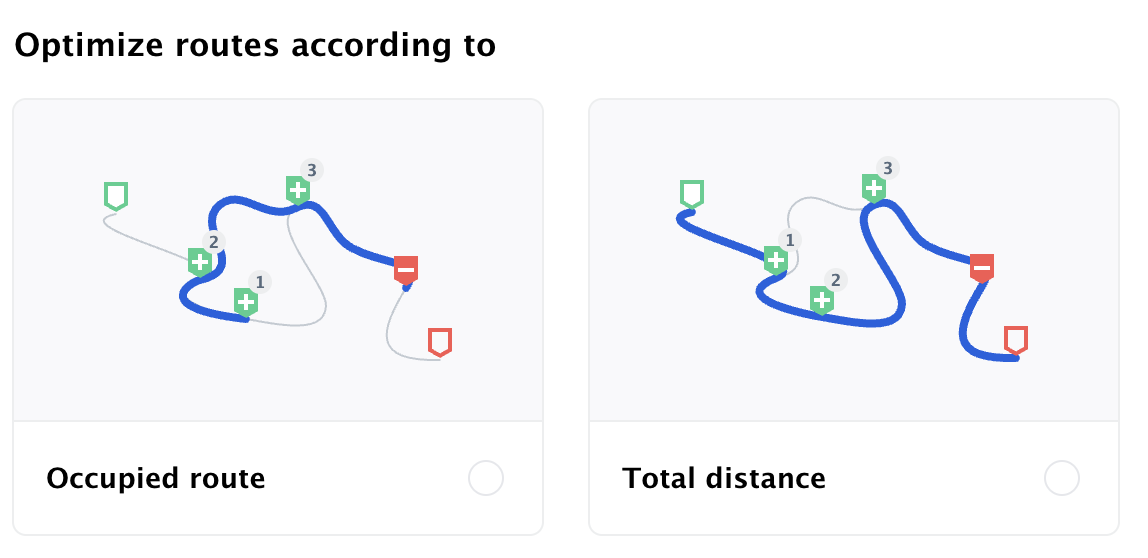
Optimize the routing issue withshipments and withoutvehicle start and end. Params are at optimization-first-call-params.json
Out of this first API call result, we build in_direct_sequence relations to get the same execution order for shipments because that is what matters for us. We add also the vehicle start and end. Look at optimization-second-call-params.json
On the second call, the API fails to assign a person due to those relations.
We wonder why the person is not able to be planned on the second call, while the relations persist the same order of the first API call.
It seems to be a rather tight problem regarding the time windows and max_time_in_vehicle for every “delivery”. Many of them around 7:00-8:00 (25000-29000).
Did you also try to add the vehicle start and end address in the first call and only set the in_direct_sequence relation in the second call?
In the first call, we omit the vehicle location on purpose:
The reason we add the vehicle only in the second call is to get the optimized route without the vehicle start and end. We’re optimizing the “busy-part” (Besetzt-Strecke) of the route and then we’re “just” adding the vehicle location in the 2nd call.
We don’t want, that the vehicle location changes the optimal busy-route sequence.
Therefore, since we’re using the exact same sequence as the first call returns (in_direct_sequence), where all contraints of the shipments are already had been taken into account, the vehicle location shouldn’t make a difference in the the second.
Yes, it should still be able to solve it. But since it is a heuristic and a tight problem it might fail to find the (sometimes well hidden) optimum. If you set the start and end address already at the initial call then you will make it a bit easier for the algorithm.
What is the underlying business reason for why you omit the vehicle start and end address? Is it because you do the first call e.g. at the beginning of the month to plan the routes and only later assign people/vehicle to them? Or because you want to “just” optimize for the shipments completely ignoring the vehicle/driver costs?
Or could you theoretically add the start+end? Because if yes, then it is very likely that you also get a better route overall and also the second call with the relations is less likely to fail.
The reason is, that some of our clients only pay (or get payed) the busy-route parts where you have persons on board (“Besetzt-Strecke”). They don’t pay (or don’t get payed) for the trip parts where no person is loaded (no shipment-pickup on board).
Which means this busy-part has to be optimized ad the empty parts have to be ignored.
The empty parts of the trip (start → 1st pickup + last dropoff → end) aren’t payed directly.
However, they still wanna know the whole route. That’s why we add the vehicle location in the second call.
We use the first call to get sequence of the busy-route. And then right after the first call, we do the second to get the whole trip, but we still keep the busy-route part.
Now that you mention it, it is indeed unexpected that even without the start and end address of the vehicle the shipment it is still unassigned (although without the relation it was assigned). I will forward and discuss this (but due to holidays in parts of Germany it won’t happen this week unfortunately)
Yes, we are analysing this. This problem differs slightly from the problems above. The second request contains an additional job (companion_6155) and relation. But still … it does not work as expected. We will find out. BTW: if you put everything in one relation, it works as expected.
This should now be fixed/improved. I initially thought it must be related to the very strict relation setting and the way we searched for a solution while respecting this relation. However, this was only part of the problem. The bigger issue was the strict definition of max_time_in_vehicle. To evaluate whether this constraint is fulfilled, you need global knowledge about the route, i.e., you need to build the route first to be able to check max_time_in_vehicle. But to build the route without a violation, you need to check max_time_in_vehicle. This was the core issue and what gave me some headache over the weekend. I solved it by deviating from the strict requirement that this constraint must be fulfilled in every route state, and instead chose a soft approach where I allow constraint violations temporarily to find solutions without violation.
PS: This might be the foundation to deal with other soft constraints, for example time windows. Therefore, as an experimental feature, there will be a new field in the solution showing the violations.
Note that the API will still behave as before — if there is a violation, the person will remain unassigned. The soft constraint is only used internally to find better solutions.
We are experiencing this algo behaviour quite often. I attached one of the examples.
The first call is able to assign all persons with returning the new “issues” property (as you explained in your last text). With the second call, the algo unassigned the person that has insufficient max time in vehicle (that was mentioned on the “issues”).
On one side, the behaviour is unintended because the second call adds the start and end addresses for the vehicle and keeps the same order of the first call result (proof that the algo is able to solve the optimization problem). We don’t get why the max time in vehicle constraint is “suddenly” considered as hard constraint in the second call ?
On the other side, the suggested solution to adjust the max time in vehicle (as the “issues” point to) is not a solution in our case because simply, max time in vehicle changes also the time windows which leads to other persons unassigned (like a vicious circle).
FYI: we have couple of other cases lately (last 2 weeks) while we used the same flow (first and second call forcing the same order of the first call result) since day one. Maybe some logic changed on your end which led to this behaviour ?
We would appreciate if we could find a proper solution (for example, if max time in vehicle is violated on first call, then the person is unassigned without waiting for the second call. That would be an intended behaviour and we can deal with it on our end).
Thanks again for your example. This is clearly wrong and needs to be fixed. Looking at the first call, it seems that max_time for person_33906 is being ignored (or not considered correctly). When you solve it and check the Table view, you can see it takes 84 minutes from pickup to delivery. That is 4 minutes over the allowed 80.
Therefore, the second call fails for jobs where the in-vehicle time is roughly equal to the max_time limit. My hypothesis is that preparation_time is not being correctly considered when evaluating this constraint. I’ll investigate over the weekend and get it fixed.
Ok. When solving the latter problem, there is "type": "max_time_in_vehicle" in the issues array with the limit exceeded, but person_33906 is still assigned. This should not happen since we do not want a fully soft approach, person_33906 must end up unassigned.
PS: my previous hypothesis regarding preparation_time was wrong.
Your first call now results in person_33906 being unassigned. This issue should be fixed.
What do you think needs to be done from our side to save you one API call? (I assume it is a workaround since we cannot deal with the underlying problem directly)
Hey @stefan, thank you for the effort, we’ll check everything on Monday.
Generally speaking, what we’re doing, is to optimize the busy/”occupied” route - the route part with passengers on board and without the empty parts of provisioning.
Here in this example, we want the optimal constellation of the underlined route part. The result must not be influenced by the vehicle location.
 (but due to holidays in parts of Germany it won’t happen this week unfortunately)