Request with difference between responses

Hey guys,

I’ve been facing a problem with my GH and I’m investigating to find out the problem.

I made a certain request, in three different point of time. The first one, the red line in 2026-01-13, the second one, the blue line in 2026-02-03, and the third one, today.
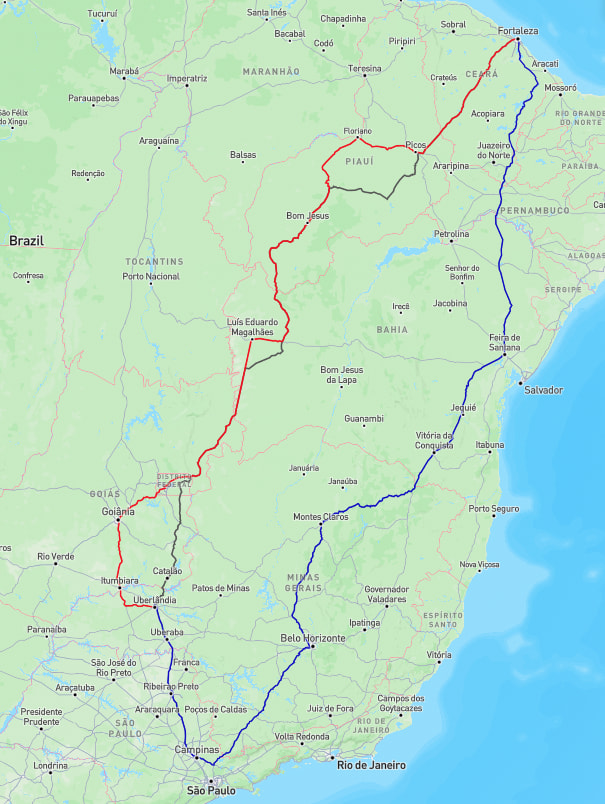
I’m running my graphhopper 9.1 in my own infraestructure k8s. And this is my configuration.

config.yml


    graphhopper:
      datareader.file: ""
      datareader.worker_threads: 16
      custom_models.directory: /graphhopper/profiles
      profiles:
        - name: car
          custom_model_files: [ car.json ]
        - name: truck
          custom_model_files: [ truck.json ]
        - name: big_truck
          weighting: custom
          custom_model_files: [ big_truck.json ]
      profiles_ch:
        - profile: car
        - profile: truck
      profiles_lm:
        - profile: car
        - profile: truck
        - profile: big_truck
      prepare.min_network_size: 1000
      prepare.subnetworks.threads: 50
      prepare.ch.threads: 2
      prepare.lm.threads: 3
      routing.non_ch.max_waypoint_distance: 100_000_000 #100.000.000
      routing.max_visited_nodes: 15_000_000 #15.000.000
      import.osm.ignored_highways: footway,cycleway,path,pedestrian,steps # typically useful for motorized-only routing
      index.max_region_search: 30
      graph.location: graph-cache
      graph.dataaccess.default_type: RAM_STORE
      graph.encoded_values: country,hgv,max_weight,max_height,max_width,toll,car_access,car_average_speed,road_access,road_class
    server:
      application_connectors:
        - type: http
          port: 8989
          bind_host: localhost
          max_request_header_size: 50k
      request_log:
        appenders: []
      admin_connectors:
        - type: http
          port: 8990
          bind_host: localhost
    logging:
      appenders:
        - type: file
          time_zone: UTC
          current_log_filename: logs/graphhopper.log
          log_format: "%d{yyyy-MM-dd HH:mm:ss.SSS} [%thread] %-5level %logger{36} - %msg%n"
          archive: true
          archived_log_filename_pattern: ./logs/graphhopper-%d.log.gz
          archived_file_count: 30
          never_block: true
        - type: console
          time_zone: UTC
          log_format: "%d{yyyy-MM-dd HH:mm:ss.SSS} [%thread] %-5level %logger{36} - %msg%n"
      loggers:
        "com.graphhopper.osm_warnings":
          level: DEBUG
          additive: false
          appenders:
            - type: file
              currentLogFilename: logs/osm_warnings.log
              archive: false
              logFormat: '[%level] %msg%n'

big_truck.json


    {
      "priority": [
        {
          "if": "car_access == false || hgv == NO || road_access == PRIVATE",
          "multiply_by": "0"
        },
        {
          "if": "max_width < 3 || max_height < 4 || max_weight < 18",
          "multiply_by": "0"
        },
        {
          "if": "road_class != MOTORWAY",
          "multiply_by": "0.2"
        },
        {
          "if": "road_class == TERTIARY || road_class == RESIDENTIAL",
          "multiply_by": "0.4"
        },
        {
          "if": "road_class == PRIMARY",
          "multiply_by": "0.5"
        },
        {
          "if": "road_class == TRUNK",
          "multiply_by": "0.6"
        },
        {
          "else": "",
          "multiply_by": "0.5"
        }
      ],
      "speed": [
        {
          "if": "true",
          "limit_to": "car_average_speed*0.9"
        },
        {
          "if": "max_height < 4.5",
          "multiply_by": "0.5"
        },
        {
          "if": "max_weight < 40",
          "multiply_by": "0.5"
        }
      ]
    }

The profiles car and truck are exactly the same available in official github repo.

I’ve checked my infra, and no changes was applied in my configuration, or, in any profile. The request are exactly the same.

I’d like to ask, what may cause this big difference in route responses. Mainly between red and blue lines?

Just a thought, those look like they could be alternate routes. GH can give alternatives in a routing response if so requested. However, it should always give the exact same route, though, if data, request and GH version remain the same. And of course, in your case, these are separate requests and not one request with alternate routes enabled. Just the way the routes have turned out, it looks like the three could be the result of the alternation algorithm. But I suppose this answer does not really solve the mystery.

hey @Mikko_Karkkainen ! yes, the redline and the blackline seems like alternatives route. But in my requests, I do not ask for alternatives, I just got the main response. But what is very weird is the blue route. I takes a path that makes no sense at all while the black and the red one does. And this have been causing some problems in my use case.

Hello @easbar / @karussell ! Do you have any idea, what may cause this behavior? Any orientation may help in my investigation.

Hello Felipe,

Have you updated the OSM file? Looking at your big_truck.json, updating your map file will definitely do that. (It does for me, which it should as new data is applied… sadly, wrong data sometimes)

Also, any reason you can’t update to 11?

You mean you get different routes for the same query, on your local instance, using the same data?

Hey guys! I’ve been deep focused on the investigation.

@floormat

Have you updated the OSM file?

Yes, I updated the OSM file. It was the only change in my whole infra. Before 2026-01-13, I was running the planet-251229, and after that, I’ve been running planet-260105.

Both OSM files were imported with the exactly same configuration, So I ran another instance of graphhopper with the old map, and compare the changes. And yes, you’re right. That’s the problem.

When you say sadly, wrong data sometimes, you mean osm changes, may cause this kind of problem? You ran graphhopper with my config, right?

Also, any reason you can’t update to 11?

I can’t upgrade it mainly because of my roadmap :sad_but_relieved_face:


@easbar , yes! Same request, same integration, same local instance, but not the same data, as I mentioned above. And that’s the problem. This caused the difference in the route.

Now I don’t know if it’s worth continuing to investigate what in OSM might have caused this problem.

@felipe.mendes

Yep. GraphHopper reads that OSM, and follows the data. (Not GraphHopper’s fault if someone puts a road_access == PRIVATE on a highway)

No, i did not use your exact JSON file, but have very similar files.

OSM data is free, and can be edited by anyone. For example, looking at your JSON file, someone can simply put a marker for road_access == “PRIVATE” in the wrong place, then your route is dead. When this happens to me, i can usually find the culprit by right clicking map, and look around where route changes, and find the reason.

Sadly, here in the United States, this is a mess for large truck drivers. Companies here charge over $15,000/mo for the data (yes, that is $180,000/yr), and you have to buy their GPS, etc, and it still is wrong sometimes. (Think overhead passes, bridge weight limits, etc.) And not trying to be rude to follow citizens here, but half of the US have no idea what a meter is, and think everything in that OSM file is in feet and miles LOL

I tried to join a group that would try to fix all the OSM data in the US just for bridge restrictions, etc, but each state has their own rules and regulations, so nearly impossible unless you make every entry by hand. (The group seemed to have stopped once they released the amount of work?)

Summary:

  1. Changing OSM can change route if that route has updated data.
  2. You can try changing things in your config file to such as not using multiply_by: 0, but that causes other problems.
  3. If you only have to deal with a small number of major routes, you can always change the OSM data yourself. (Here, one state has thousands of bridges, overpasses, etc, and having to deal with all 48 at once is daunting).

If it makes you feel any better, Google Maps, etc sent a bunch of large semis (the 53 foot trailer ones) up a mountain pass over here when a major highway had a landslide…. the “other” mountain pass was ONLY meant for cars (nothing over 18 feet because of the switchbacks). Let’s just say it took them DAYs to clear that mess up.